

01
Design & AI-assisted UI/UX
Figma plus an AI design assistant. Layouts, a real design system, component suggestions and accessibility checks before a line of code exists.
Want to talk to our engineers? Schedule a call
Want to talk to our engineers? Schedule a call
Tell us your operation and we’ll send the two numbers that matter for your lane.
Want to talk to our engineers? Schedule a call
Services · Speed Development
Not a prototype and not a demo. A production application on your cloud account, with pipelines, test coverage, monitoring and a documented handover — delivered by a small senior team running a disciplined AI-assisted method.
Why it works
Speed does not come from typing faster. It comes from specifying precisely, generating with full context, and reviewing every output against written success criteria.
The process
Design through deployment with an iteration loop in the middle and a feedback loop around the whole thing. This is the flow every engagement runs on.
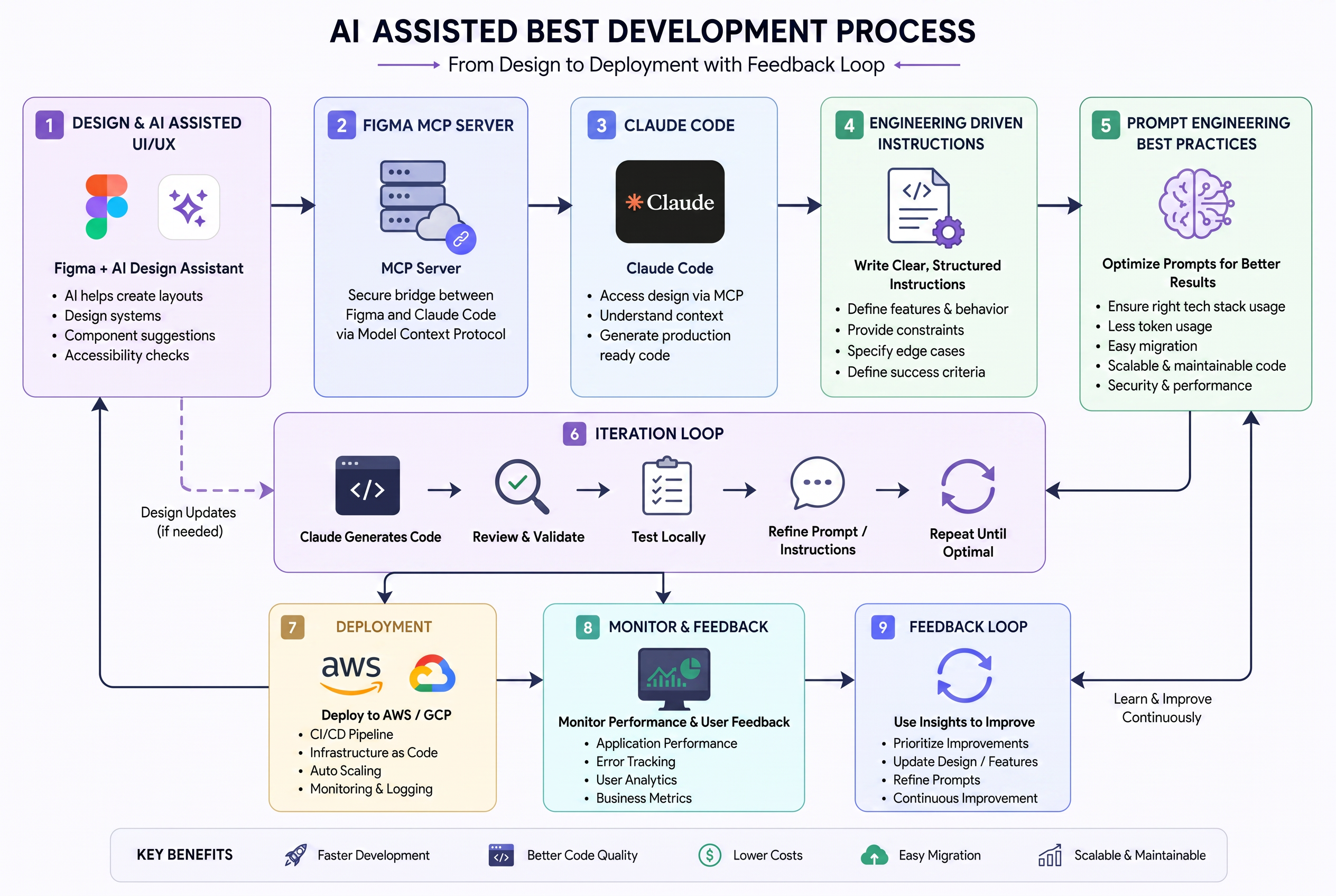
Nine stages
Figma plus an AI design assistant. Layouts, a real design system, component suggestions and accessibility checks before a line of code exists.
A model-context bridge reads the Figma file directly, so the build starts from the actual design tokens and screens instead of a developer's interpretation.
The coding agent works with full repository context — existing patterns, data models and conventions — and generates code that fits the codebase it lands in.
Every feature is specified before it is built: behaviour, edge cases, data contracts and explicit success criteria. Ambiguity is what makes projects slip.
A house standard for how we instruct models — right stack usage, low token waste, easy migration, maintainable and secure output.
Generate, review, validate, test locally, refine the instruction, repeat until optimal. Design updates feed back to stage one when the loop finds a gap.
CI/CD pipelines, infrastructure as code, auto-scaling, logging and monitoring — set up as part of the build, not bolted on before launch.
Application performance, error tracking, user analytics and business metrics instrumented from day one so decisions come from data.
Insights are prioritised into the backlog, prompts and instructions are refined, and the next cycle starts with a smarter system than the last.
The timeline
Environments go live early and stay live. You see the application working every week instead of waiting for a reveal at the end.
Scope, data model, architecture, and the UI system in Figma with accessibility built in. Success criteria written down.
Feature-by-feature generation, review and local test cycles. Environments live from week three, so stakeholders use it while it is built.
Full regression, performance and security passes. CI/CD, auto-scaling and monitoring finished on the production account.
Go live with analytics and error tracking active, and the first improvement cycle already scoped from real usage.
Key benefits
Weeks of scaffolding, boilerplate and glue code collapse into days of directed generation and review.
Specification-first work plus mandatory human review catches defects before QA ever sees them.
A smaller senior team covers the ground a large mixed team used to, without the coordination overhead.
Standard stacks, no proprietary lock-in, and infrastructure defined in code you keep.
Design systems, typed contracts and documented conventions mean the second year costs less than the first.
Working software in the environment every week, not a status deck describing one.
Scope
No separate QA vendor, no infrastructure contractor, no handoff gap between design and build. One accountable team from first workshop to production.
Tell us the scope and the deadline. We’ll map it against the method and show you what three months actually delivers.